
博主头像
XLJ 喜樂君 - 代码是什么

焉知非福

Typecho 益益AI评论总结文章回复助手

文件名: YiyiAiReply.zip
文件大小: 8.78 KB

介绍: 根据每个文章的内容,给评论区评论的人进行回复,可自定义角色扮演,细致入微的教程和回复
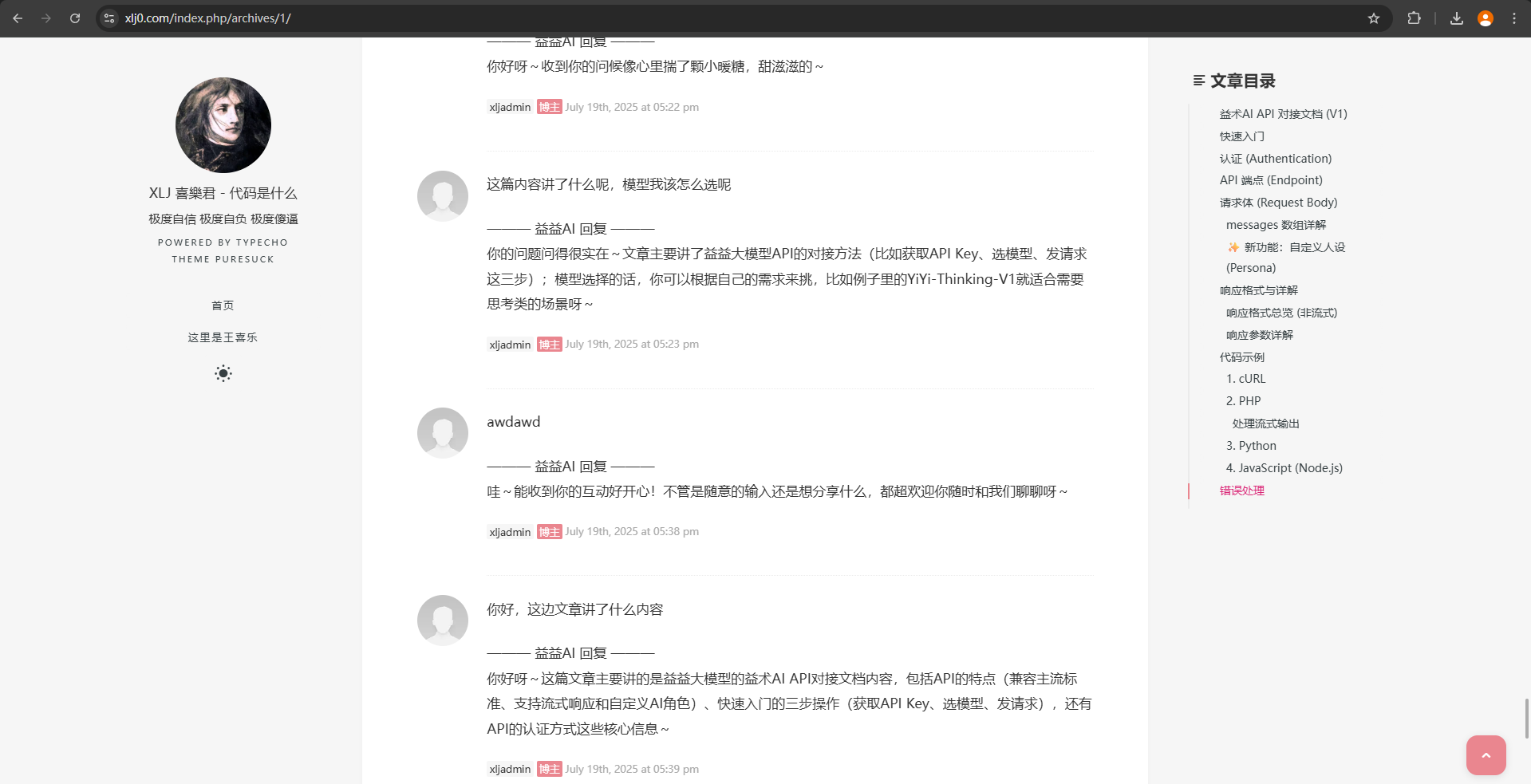
效果图
效果图

  1. 下载文件
  2. 上传到 typecho index.php同级目录 解压缩
  3. 到后台 -> 控制台 -> 插件 -> YiyiAiReply 开启 -> 设置 -> 输入你的key
  4. 找到typecho目录下的 usr 文件夹下的 themes 文件夹下的 你的主题文件夹下的 footer.php
  5. 然后找到 这个代码, 可以ctrl + f也可以用鼠标找
  6. 在这个 代码上方 填入以下代码
  7. 去评论区 试试吧
<?php if ($this->is('post')): // 这段代码只在文章页面执行 ?>
<script>
    // 创建一个全局JS对象来存放由PHP传递过来的文章数据
    window.currentPostData = {
        title: <?php echo json_encode($this->title ?? ''); ?>,
        content: <?php echo json_encode(strip_tags($this->content ?? '')); ?> // 直接使用完整内容,不截断
    };
</script>
<?php endif; ?>

<script>
    /**
     * 提交函数(核心修改部分)
     */
    async function handleCommentSubmit(event) {
        const form = event.currentTarget.closest('form');
        const commentTextarea = form.querySelector('textarea[name="text"]');
        const submitButton = event.currentTarget;
        const originalComment = commentTextarea.value.trim();

        if (!originalComment) { return; }
        
        event.preventDefault();

        // 保存原始按钮状态(兼容button和input类型的提交按钮)
        const isButtonElement = submitButton.tagName === 'BUTTON';
        const originalButtonText = isButtonElement 
            ? submitButton.textContent 
            : submitButton.value;
            
        submitButton.disabled = true;
        
        // 更新按钮文本(根据按钮类型使用不同属性)
        if (isButtonElement) {
            submitButton.textContent = '益益AI正在思考...';
        } else {
            submitButton.value = '益益AI正在思考...';
        }

        try {
            const handlerUrl = '/yiyi_handler.php';

            // 使用完整文章内容作为上下文
            let postContent = document.title; // 默认备用方案
            if (window.currentPostData && window.currentPostData.content) {
                postContent = `${window.currentPostData.title}\n\n${window.currentPostData.content}`;
            }
            
            const response = await fetch(handlerUrl, {
                method: 'POST',
                headers: { 'Content-Type': 'application/json' },
                body: JSON.stringify({ comment: originalComment, postContent: postContent })
            });
            
            if (!response.ok) { throw new Error(`Network request failed: ${response.status}`); }
            
            const data = await response.json();
            if (data.success && data.reply) {
                const separator = '——— 益益AI 回复 ———';
                commentTextarea.value = `${originalComment}\n\n${separator}\n${data.reply}`;
            } else {
                throw new Error('AI生成回复失败');
            }
        } catch (error) {
            console.error('[YiyiAI] Error:', error);
            alert('抱歉,AI回复服务暂时出现问题,您的评论仍将正常提交。');
            commentTextarea.value = originalComment;
        } finally {
            submitButton.disabled = false;
            
            // 恢复按钮原始文本
            if (isButtonElement) {
                submitButton.textContent = originalButtonText;
            } else {
                submitButton.value = originalButtonText;
            }
            
            form.submit();
        }
    }

    /**
     * 脚本主入口(保持不变)
     */
    document.addEventListener('DOMContentLoaded', () => {
        const commentTextarea = document.getElementById('textarea');
        const commentForm = commentTextarea ? commentTextarea.closest('form') : null;
        if (commentForm) {
            const submitButton = commentForm.querySelector('button[type="submit"], input[type="submit"]');
            if (submitButton) {
                submitButton.addEventListener('click', handleCommentSubmit);
            }
        }
        renderExistingAiReplies();
        setTimeout(renderExistingAiReplies, 500);
    });
</script>
Typecho 益益AI评论总结文章回复助手
https://xlj0.com/index.php/archives/4/
本文作者 xljadmin
发布时间 2025-07-19
许可协议 CC BY-NC-SA 4.0
发表新评论